


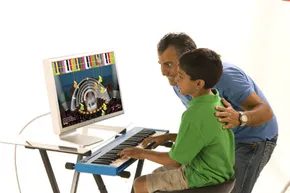
Let’s be real about those early music lessons. We’ve all been there. The scales. The droning recital pieces. The teacher’s house that smelled faintly of mothballs and old paper. You lasted two years. Maybe three if you had a strict dad. And now you’re dragging your own kids through the same grind, hoping they’ll get the brain-boost stats we hear about constantly. Better grades. Better jobs. Self-discipline. All of that.
But most kids quit. Or they endure it with a pained expression that ruins the family dinner table for a decade.
Unless they’re actually inspired. Which is rare when you’re forcing a seven-year-old to master Für Elise before they can tie their shoes.
Enter Piano Wizard. It’s not a replacement for a real instructor. It’s not even close. It’s a video game. A rhythm game, specifically. Think Guitar Hero or Dance Dance Revolution, but with keys. And notes. And actual music theory buried under the neon lights.
The hook? Kids as young as three can learn to play a recognizable song in minutes. No scales. No boredom. Just the dopamine hit of hitting the right key at the right time. It’s musical training wheels. You put them on to build confidence. Then you take them off when the kid is ready to ride.
Here is how the whole thing actually works.
The Setup Isn’t Hard
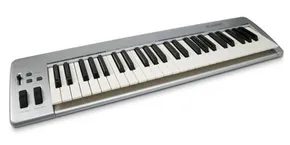
You need two things. A computer. PC or Mac. Doesn’t matter. And an electronic MIDI keyboard. Not a digital piano with heavy, weighted keys like a grand instrument. A simple, lightweight MIDI controller. The cheap kind. You can get one for the price of a weekend binge.
Connect the keyboard to the computer. Install the software. Plug in. That’s it. The game recognizes the input. It sees what you hit.
Gameplay Mechanics
The screen looks like a scrolling highway of colored blocks. They rush toward a color-coded keyboard at the bottom. When a block hits the corresponding key on the screen, you press that key on your physical MIDI keyboard.
Hit it in time. The game registers a note. Play a sequence of notes correctly. You just played a song.
It’s simple. It’s fast. It’s addictive.
The structure mirrors those arcade hits you probably burned holes in your couch with. The rhythm drives the action. The visual cues guide the hands. There’s no sheet music to decipher at first. No treble clef. No bass clef. Just colors. Red is C. Blue is D. Green is E. You learn the layout without realizing you’re learning.
The game is designed to awaken children to the possibilities of music. It builds the confidence needed to eventually pick up a real piano and tackle complex songs.
Who Is This For?
The marketing says ages three and up. That’s aggressive. But the mechanics are intuitive enough that a preschooler can figure it out by watching you play for five minutes. They don’t need to read music. They don’t need patience. They just need the reflex to mash the key when the block lands.
For older kids? It’s a bridge. A way to get interested in music without the immediate pressure of perfection. You mess up

Getting Set Up
Piano Wizard targets kids as young as three, though success depends on whether your little one already knows how to handle a video game controller. You need that basic hand-eye coordination. The software itself is strictly for computers—Windows and Mac both work. Don’t bother looking for a Nintendo Wii, Xbox 360, or PlayStation 3 version. It’s not there.
If you want a console-style experience, there’s a Fisher-Price “I Can Play” piano. It runs the same software but plugs directly into a TV. We’ll get to that hardware later. For now, let’s look at how you actually buy this thing.
Pricing and Packages
What you spend depends on two things: your child’s skill level and whether you already own a MIDI keyboard. The Piano Wizard Online Store handles all sales, but the options can get confusing fast.
If you already own a keyboard:
You just need the software and some colored stickers. The software comes in two flavors:
* Easy Mode ($49.95): Includes 100 songs.
* Premier ($119.95): Includes 200 songs plus access to WizardTunes, a subscription service for unlimited MIDI song downloads.
If you have the keyboard but lack the cables, you can buy a package that bundles the software (either version), MIDI connection cables, and the color-coded stickers.
If you don’t own a keyboard:
You have to buy a bundle. You can choose between a standard 49-key keyboard with full-size keys or a compact 37-key mini-keyboard with a built-in USB cable. The most expensive route is the Premier software bundled with the 49-key board, cables, and stickers for $199.95. The budget-friendly entry point is the Easy Mode software with the 37-key mini-board for $99.95.
Buying accessories separately is possible, but it’s a worse deal. That 49-key keyboard alone costs $139.95. Bundling saves money.
How the Tech Works
Once you have the gear, you need to understand MIDI.
Piano Wizard doesn’t care about audio. It cares about data. The keyboards sold as part of the package are MIDI controllers. They don’t make sound. At all. They just send MIDI messages to your computer. The computer then generates the actual music.
The songs inside the game are MIDI files. Through the WizardTunes service, you can download more of these files to keep the game fresh. It’s a data-driven game, not an audio-driven one.
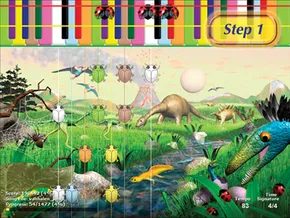

The Piano Wizard system doesn’t throw you into the deep end of music theory. It uses a four-step process designed to take you from knowing nothing about music to actually reading notes on a staff. But before you can read the lines and spaces of a standard treble clef, you have to get comfortable with the mechanics of play.
The entry level is stripped down. You aren’t looking at notes or keys yet. You are looking at objects and colors.
Step one is tactile. You place colored stickers on the keys of your physical keyboard. This creates a direct visual link between what you see on screen and what your fingers hit. When the game launches, you see a digital representation of that same color-coded layout at the top of the screen. It’s a cheat code for muscle memory.
Songs start with color-coded objects. Think circles, dinosaur eggs, or stars. These items scroll upward from the bottom of the monitor. The color of the object tells you which key to press. Timing is everything. When the object hits the top, it aligns with a colored key on the digital keyboard. You need to press the corresponding physical key at that exact moment. Get the sequence right, and you are playing a song.
This basic lesson focuses on two fundamental concepts: pitch and timing. Pitch refers to the frequency of a sound as the ear perceives it. In formal music theory, we assign names to these pitches: A, B, C, D, D-flat, F-sharp, and so on. Piano Wizard doesn’t teach you those names right away. Instead, it builds familiarity. You learn that different keys produce different sounds. You start to understand the relationship between the physical action of pressing a key and the auditory result. It’s a foundation. A necessary one. But it’s only the beginning.

Vertical Vision: How Piano Wizard Teaches You to Read Music
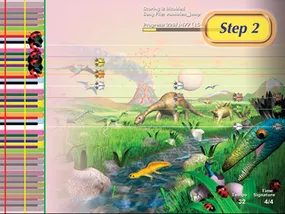
The game shifts gears in its second phase. Suddenly, the on-screen keyboard tilts on its side, anchoring itself to the left edge of your display. The rhythm objects stop rising from the bottom and instead sweep across your view from right to left.
It feels awkward at first. You are staring at a vertical column of data while your physical hands rest on a horizontal piano. The disconnect is real. But there is a method to the madness.
By rotating the interface, the developers mimic the actual architecture of musical notation. In standard sheet music, pitch is spatial. Higher notes sit higher on the staff. Lower notes drop toward the floor. Piano Wizard adopts this logic. As you play, the colored blocks for higher pitches appear higher up on the screen. Lower pitches sink lower.
“Whether the player realizes it or not, he or she’s starting to learn the basics of reading music.”
This is not just a visual tweak. It is an educational bridge. You are training your brain to associate vertical position with pitch height. You are learning to read music without even knowing you are doing it. The game hides the lesson inside the gameplay.
Is it easy? No. It requires retraining your eye-hand coordination. Your eyes track left-to-right movement while your fingers press keys based on vertical height. It is a cognitive juggle. But once it clicks, the barrier between playing and reading begins to dissolve. You are no longer just hitting blocks. You are interpreting notation.
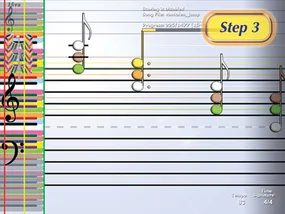
The Staff Takes Shape
This is the pivot point. The abstract, color-coded blocks finally shed their plastic skins to become actual musical notes on a real staff. It’s not quite literacy yet, but it’s close enough to smell the ink.
The color is still the primary hook. You’re still looking for the red dot, the blue block. That visual anchor keeps you from panicking. But something else is happening in the background. You’re getting used to the visual clutter. The staff isn’t just a grid anymore; it’s a landscape of varying lengths and shapes.
You’re starting to recognize the whole notes floating like islands. The quarter notes marching in step. The eighth notes clustering together like they’re whispering secrets. Sharps and flats appear as tiny, jagged interruptions. You don’t need to know the theory yet. You just need to know how they look when they’re stacked on top of each other. The transition is almost complete. The code is breaking.
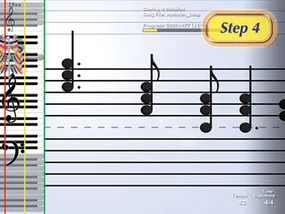
Step four is where the training wheels finally come off. The colorful stickers vanish from your keyboard, and the on-screen notes shift from a rainbow of color to standard black. You are no longer just matching hues; you are reading the music.
The notes scroll across the screen just like they would on a traditional sheet of paper. The only difference? You aren’t looking down at a desk. You’re looking up.
This marks a pivotal shift in how you process the instrument. You are now reading notes exactly as they are written in standard notation. It forces your brain to make a different connection—one that mirrors how a professional pianist approaches a score.
Once you’ve mastered this phase, you have two clear paths forward. You can step out and begin taking regular piano lessons with a teacher. Or, you can stay within the ecosystem and continue with Piano Wizard Academy.
The program doesn’t just stop at teaching you to play. It offers a structured curriculum for those who want to keep going. The next section dives deeper into Piano Wizard Academy and the rest of the Piano Wizard products available. It’s not just a game. It’s a progression.
“The only difference is that the notes continue to scroll across the screen.”
This transition is critical. Without the crutch of color, you’re building real literacy. If you skip ahead, you’ll likely hit a wall. The system is designed to build muscle memory alongside cognitive recognition.
So, what happens next? The academy expands on these skills. It adds theory. It adds repertoire. It adds structure.
If you’re still on the fence about whether Piano Wizard is just a toy or a legitimate tool, this step is the answer. It bridges the gap between play and practice.
The next part of the journey is about sustainability. Can you keep this up? Can you translate what you’ve learned on the screen to a real piano? The academy is the bridge.
More on that next.

Moving Beyond the Game: The Piano Wizard Academy
The Piano Wizard Academy serves as the crucial bridge between gaming and real instrument mastery, often referred to as “step five” of the four-step Piano Wizard System. It isn’t just a continuation; it is a dedicated set of DVD lessons designed to help students transition from the screen to a real piano. The package includes sheet music for either 20 or 50 lessons, focusing on advanced techniques like phrasing, dynamics, and posture. It teaches what the game misses: the nuance of actual performance.
WizardTunes Subscription Models Explained
WizardTunes is the online service for downloading new MIDI songs to add to the Piano Wizard game. It offers full MIDI arrangements of thousands of different songs across many musical genres: popular, classical, rock, country, religious, opera and children’s. Songs include both right- and left-hand parts designed for more advanced students. WizardTunes only works with the Premier version of the Piano Wizard software.
There are different options for using WizardTunes. At the Bronze membership level, you only pay for each song that you download. The price of an individual song is $2.99. But there are discounts if you sign up for a monthly (Silver) or annual (Gold) subscription to WizardTunes. The Silver subscription charges $9.99 a month and allows up to five free downloads a month. Any downloads beyond the first five cost $.99 each. The Gold subscription is $59.99 a year and allows for 75 free downloads. Additional songs are also $.99 each.
Hardware Alternatives: Fisher-Price I Can Play
For those looking for non-computer solutions, the I Can Play piano from Fisher-Price offers a distinct experience. It is sold as a stand-alone keyboard that connects directly to a TV set. The piano comes with a game cartridge that includes eight Piano Wizard songs and two games. The game play is exactly the same as the Piano Wizard computer software. Students can choose from four different levels of play and whether they want to play with their right hand, left hand or both. You can also buy additional cartridges with more songs and games.
Fisher-Price also offers an I Can Play guitar that works like the I Can Play piano. There’s a guitar-shaped controller that plugs straight into the TV and runs on cartridges loaded with the Piano Wizard songs. The Piano Wizard Web site says that a computer-based Guitar Wizard video game is currently in development.
Further Resources
For more information about Piano Wizard, electronic music and related topics, check out the links on the next page.
Lots More Information
Related HowStuffWorks Articles
-
How MIDI Works
-
How Guitar Hero Works
-
How Electric Guitars Work
-
How Band Equipment Works
-
How Baby Einstein Works
-
Music Activities for Kids
More Great Links
-
Piano Wizard
-
National Association for Music Education
-
Music Teachers National Association
Sources:
-
“Fisher-Price Tickles the Ivories with New Platform That Encourages Music Appreciation.” Fisher-Price. Feb. 2, 2006. http://www.i-can-play-piano.info/release-pages/yahoo-tickles.htm
-
Music Wizard Group. http://www.pianowizard.com
-
“Piano Wizard Introduction.” Allegro Multimedia. http://www.allegromultimedia.com/The_Theory_behind_the_lack_of_theory.htm


